Images are one of the best ways to increase engagement for your business. In fact, including images on social media posts can lead to 40% more shares than posts without photos.
However, it’s important to keep in mind that online photos are always owned by someone else. If used without permission (such as a Creative Commons license), the original owner can file a lawsuit for copyright infringement. Additionally, Google complies with the Digital Millennium Copyright Act (DMCA) and can disable access to content on your website, blog, social media, etc. that is used without permission.
To avoid these issues and still include images on your marketing materials, check out these 7 stock photo websites and find the perfect pictures for your business.
Free Websites:
All of these websites provide stock photos completely free of charge.
Vecteezy boasts a large collection of both images and videos for free download and commercial use. Browse their free selection or gain access to premium stock photos and footage by joining Vecteezy Pro.
Facebook and Instagram are two of the most popular social media platforms, especially for marketing your business. Combined, the two have over 4 billion active monthly users. To reach these users, it’s important to consistently post and stay active on social media. One easy way to do so in an organized manner is through Meta Business Suite’s pre-scheduling feature, where you can plan out the time of day, publish to specific groups, boost posts, and more up to 75 days in advance.
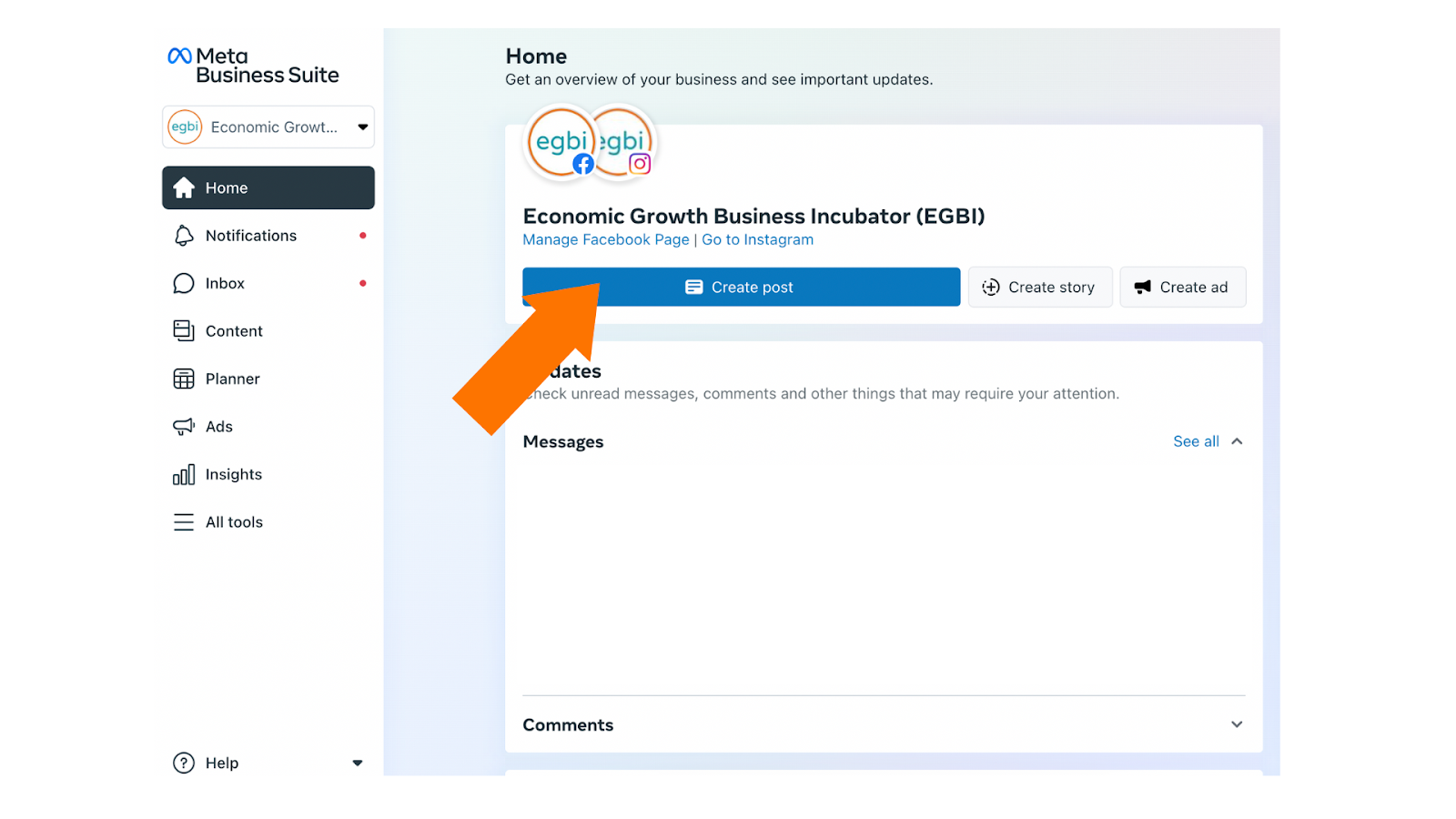
Find the step-by-step instructions to pre-scheduling your posts, stories, and ads below:
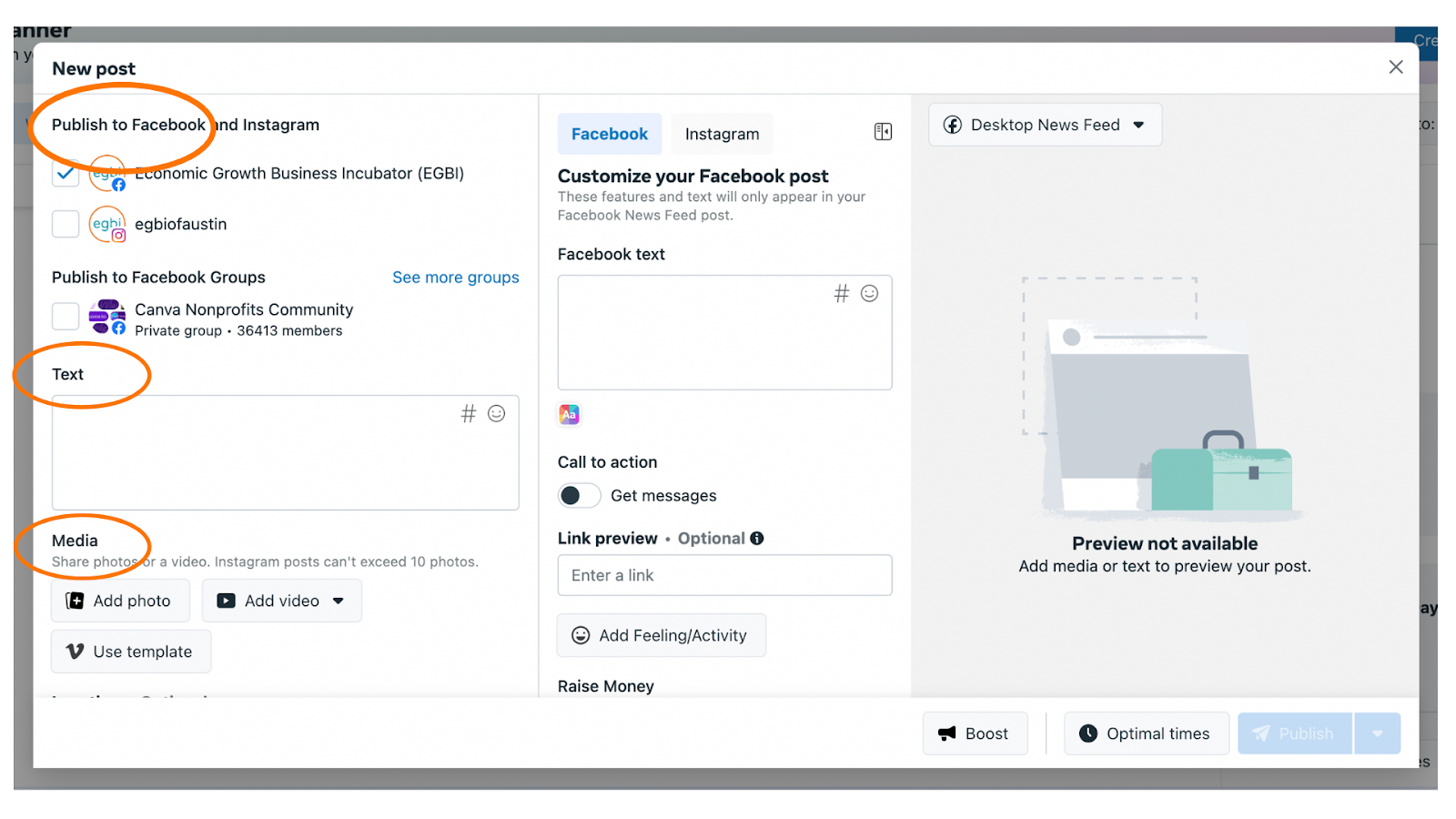
3. Here, you can choose to post to Instagram and Facebook, add in your post caption, and upload content.
4. To schedule your post, click on the dropdown arrow next to the “Publish” button and select “Schedule post”.
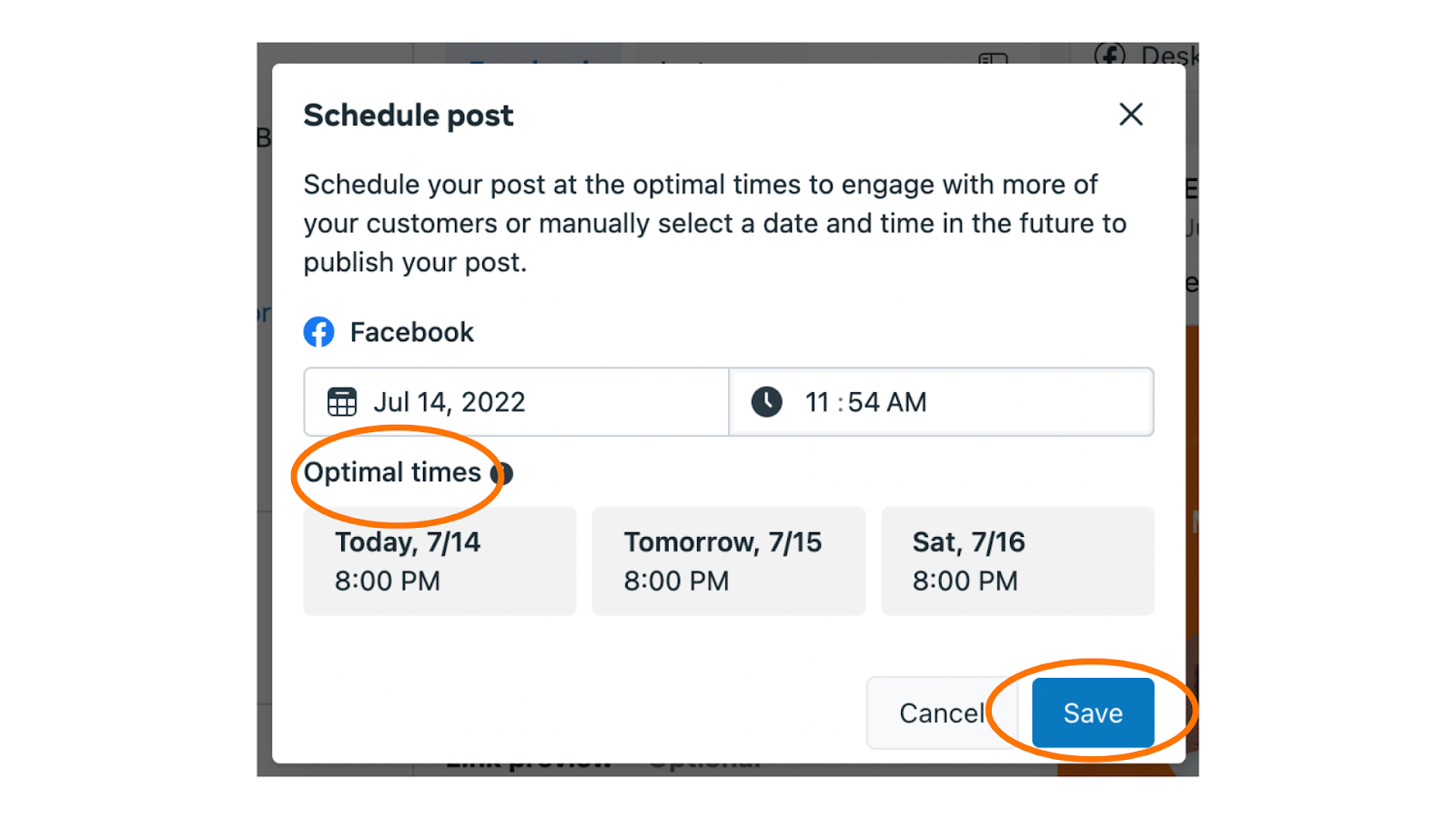
5. Now, select your preferred time. A great tool to utilize is that Facebook will provide suggestions on the optimal times to post for the most engagement.
6. Click save and the “Schedule Post” button at the bottom right.
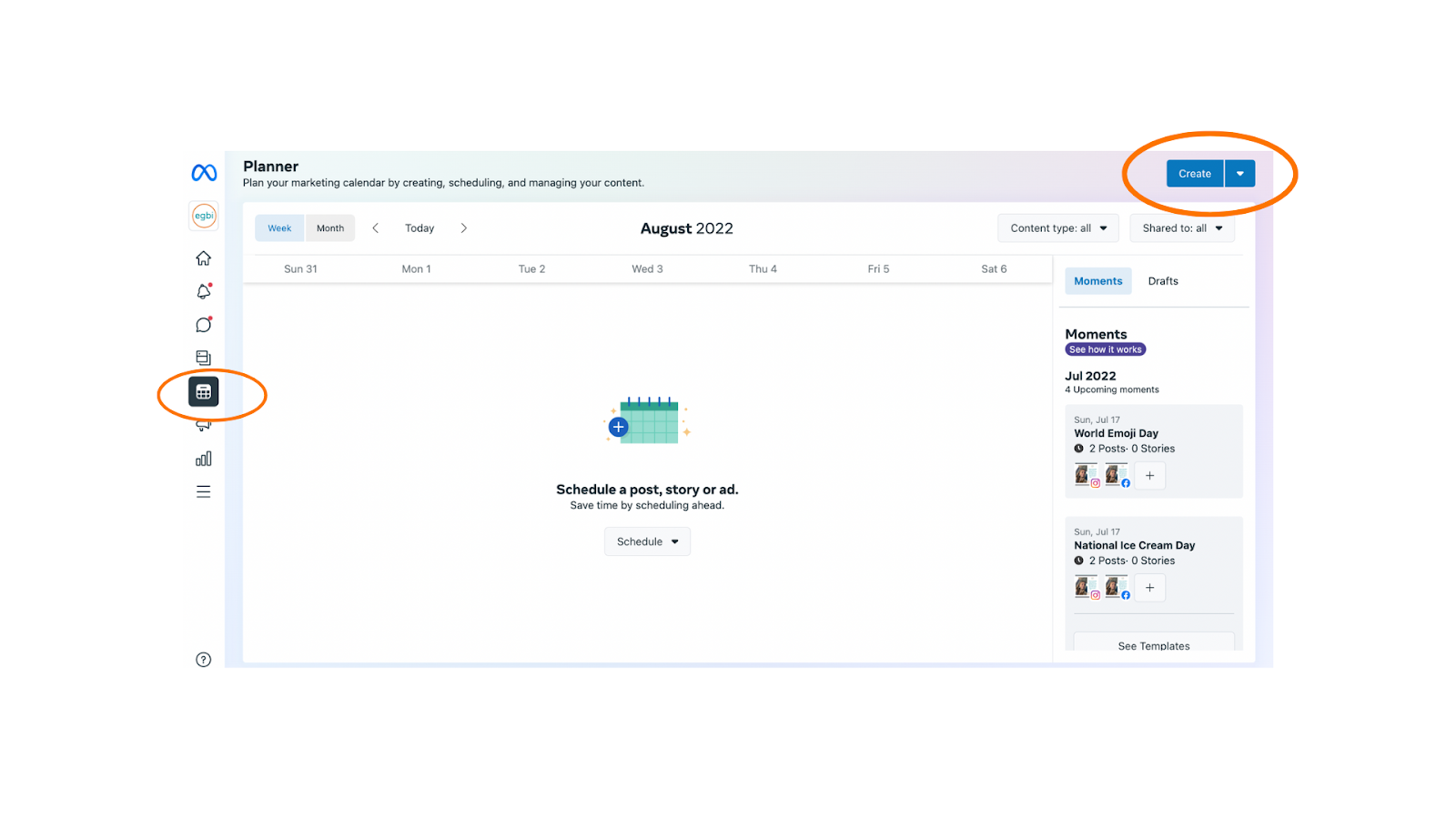
7. To view your overall calendar of posts, click on the planner tab on the main page. You will be able to view your upcoming posts and schedule content, including posts, stories, reels, and ads all from this page.
8. Congratulations! You’re now ready to plan out your social media posts and grow your audience.
Email is one of the most important parts of your business. In fact, it’s used by 80% of small businesses as their primary customer acquisition and retention channel. Thus, setting up your email professionally is instrumental for your business’ success– be sure to avoid the following mistakes.
#1: Using a personal email
The email address will most often be the name of your business. Avoid using a personal email address, even if you are the only employee– you should create a new, separate business email. Not only does using a personal email create an unprofessional look, but keeping personal and business operations separate is important for organization. You don’t want to risk having client information mixed with personal subscriptions.
#2: Having a public email domain
You should strongly consider purchasing an email domain for your business, which will have a similar look to your website domain. For example, intern@egbi.org is an email address with @egbi.org as the domain, whereas egbi.org is the website address. This is a baseline for setting up your business, as it signals that your business communication is established and professional. Additionally, a private domain is practical to ensure security for your business, as free addresses (such as Gmail or hotmail) are tied to the provider. You can purchase a domain through several providers, including GoDaddy, Microsoft 365, Google Workspace, Titan (via Hostinger), and more.
While email may seem simple, avoiding these mistakes ahead of time can ensure a professional start to your business.
Jeremiah Bentley is the vice president of Marketing & Community Affairs at Texas Mutual Insurance Company, the state’s leading provider of workers’ compensation insurance. He oversees the company’s marketing, public relations, advertising, community relations, digital media and customer outreach efforts. Jeremiah is on the board of directors for the Greater of Austin Chamber of Commerce, Leadership Austin, United Way for Greater Austin, the Austin Ed Fund and the Greater Austin Hispanic Chamber of Commerce. He also serves in a variety of other roles in community organizations throughout the Austin area. Jeremiah is a member of the Austin Area Research Organization and is a 2015 graduate of the Leadership Austin Essentials program. Jeremiah lives in northwest Austin with his wife Brandy and two young boys. He’s active in the local elementary school, local soccer community and at Bethany United Methodist Church. He’s a graduate of the University of Texas-Arlington with a BS in University Studies.
Jeremiah Bentley shares his experience as a supporter of EGBI.
To get started, would you mind telling us a fun fact about yourself?
During the day, I’m the vice president of marketing & community affairs for Texas Mutual Insurance Company. Outside of work, my passion is soccer. I’m the co-host of Moontower Soccer, Austin’s most popular podcast. We put out a new episode every Tuesday covering the week’s match, discussing team news and interviewing players & front office personnel.
Why should people consider supporting or volunteering with EGBI?
EGBI fills an important niche in Austin in a very unique way. There’s no other organization that I can think of that provides such meaningful direct support for entrepreneurs and small business owners. The coaching services provided by EGBI volunteers have enabled countless businesses to grow and thrive, allowing Central Texans the opportunity to create a better life for themselves and their families. It seems like there’s no more rewarding work or volunteering opportunity than to help people realize the dreams that they have for themselves and help client unlock their human potential.
Why do you think it is important to support our Celebrating Success event?
The Celebrating Success event is one we’ve been involved with for a few years. The event exposes people who may not know about EGBI to the work of the organization. We’ve brought community partners and employees to the event in the past who had never heard of EGBI. But, once they saw the stories and understood EGBI’s work, they left inspired. It’s also important for the clients to see the success of others. Sometimes, when someone is struggling to build a business, they may feel like they’re alone. Events like this expose people to the real opportunities and potential out there.
Why is it important for people to support organizations like EGBI?
Organizations like EGBI are important because they create opportunities for individuals and help grow the economy of Texas. Small business is the lifeblood of our economy and every business starts with a person and an idea. Providing the coaching that allows those businesses to scale will help us all thrive in the future.
In 2021, EGBI volunteers put in more than 130 hours to help EGBI support and serve over 400 small businesses. Supporters like Jeremiah make this possible and continue to help EGBI pursue their mission of training, coaching, and supporting aspiring and existing business owners who face barriers to growing a successful business.
Want to get involved too? Contact us to find out how you can volunteer or donate.
Google Voice is a telephone service that provides users a second phone number for use through your web browser. There are key advantages to using Google Voice for your business.
Device Variety
Google Voice can be used through a variety of devices– including laptops, iPads, and more– meaning you do not need to rely on only your phone to make and answer calls.
Affordability
Google Voice is completely free for calls over WiFi to the United States, Mexico, and Canada and charges a slight per minute rate for international calls, depending on the country.
Voicemail Transcriptions
Google Voice allows users to automatically transcribe voicemails into text, removing the hassle of audio voicemails.
Google Voice for Business Benefits (for those subscribed to Google Workplace)
Synced Communications
Because Google Voice operates through the cloud, calls are synced to all Google Voice devices. This means that as long as you are online, you will never miss a call. You can also transfer calls between devices.
Google Calendar Integration
Google Voice has the option to sync with Google Calendar– meaning calls made when you are out-of-office will automatically be sent to voicemail.
Interested? To sign up for Google Voice, follow these steps: